

Ball-by-ball scoring
Record runs, wickets and extras. Give supporters a live scorecard to follow from the first delivery.

Built for local cricket
Score every ball, run your tournament and bring the match to fans beyond the boundary.
Start with your role
Pick a task to see its real VilCri screen. Every preview uses sample tournament data.
Explore the app
Choose a tab to explore VilCri screens with a sample local tournament.
Start with featured series, live matches, upcoming fixtures and results.
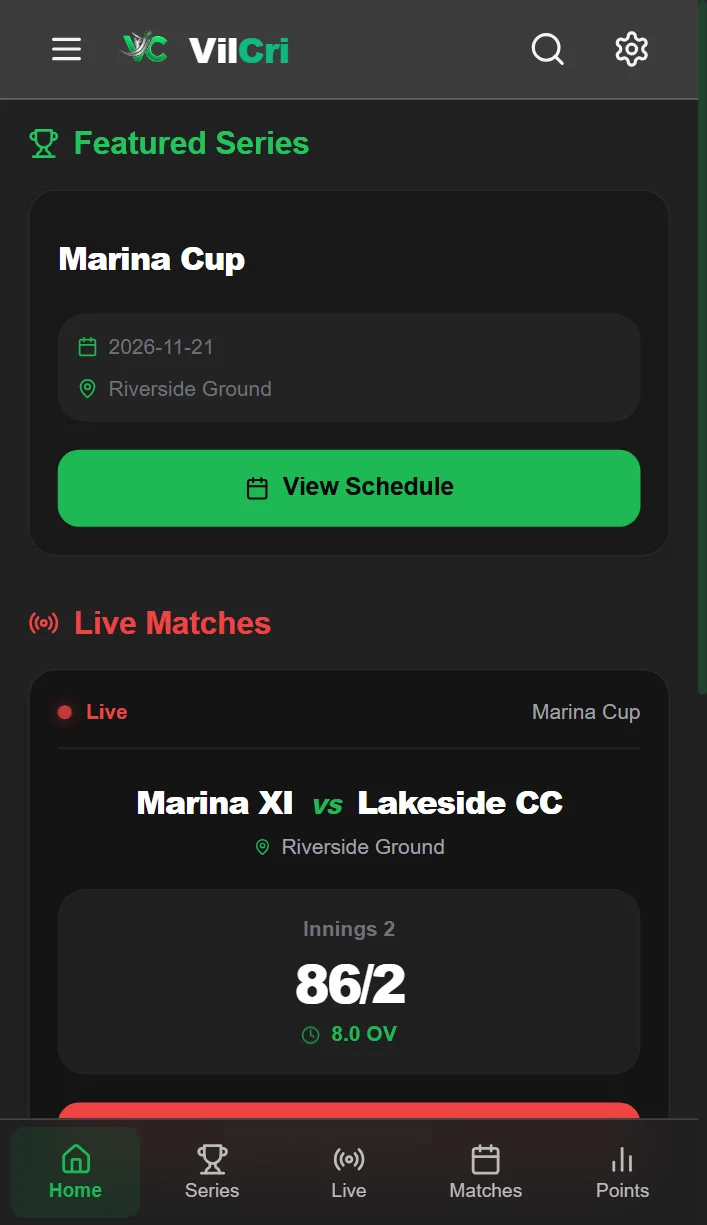
The matchday toolkit
Record runs, wickets and extras. Give supporters a live scorecard to follow from the first delivery.

Register teams, schedule fixtures and keep the points table in one place throughout your tournament.

Explore the Director Studio and score overlay designs. The app reserves live video streaming for Version 2.0.
Animated app tour
Tournament details. Create or edit the dates, venue, entry fee and team limit. List cash prizes or awards for each finishing position. The organiser dashboard also shows active tournaments, team registrations and scheduled or live matches.
Posters and promotion. Design a poster from a template, preview it with the tournament details or upload your own artwork. Supporters can download the finished poster from the tournament page.
Play chapter 0:00Team portal. Sign in with a one-time code, update the team profile, invite players by ID and manage the squad and pending invitations.
Bookings and payments. Teams can register for tournaments and track their booking status. Organisers can review cash entries or UPI payment screenshots and approve or reject bookings.
Play chapter 0:06Match scheduling. Select the teams and round, set the match time and overs, then update fixtures as the tournament progresses. Create the next round in bulk from qualified teams.
Tournament bracket. Follow teams from the league phase through the quarter-finals, semi-finals and final. Teams can also open their own match schedule.
Play chapter 0:12Scorer controls. Set the toss, select batters and bowlers, then record runs, extras, dismissals and retirements. Undo the last delivery when a correction is needed.
Innings and results. Track the target through the chase, start a Super Over for a tied match and share the match scorecard on WhatsApp.
Play chapter 0:18Director Studio preview. See the camera slots, switching controls and microphone options in the studio interface.
Graphics preview. Browse the score overlay designs. The app currently labels live video streaming as reserved for Version 2.0.
Play chapter 0:24Player portal. Sign in with a one-time code, edit a profile and playing style, share a player ID, respond to invitations and see which teams you play for.
Career record. Review batting and bowling figures, career highlights and match history. Fans can also open public profiles for teams and individual players.
Play chapter 0:30Match centre. Browse upcoming, live and completed matches. Follow the toss, recent balls, innings commentary, batting and bowling scorecards and partnerships.
Tables and leaders. Compare points and net run rate or look up leading batters and bowlers. Completed scorecards can also show best batter, best bowler and player of the match.
Play chapter 0:36Nine language options. Choose English, Tamil, Hindi, Telugu, Kannada, Malayalam, Marathi, Bengali or Arabic. Arabic uses a right-to-left layout.
Appearance and support. Switch between light and dark themes, or open the contact page to reach VilCri support.
Play chapter 0:42Hands-on sample
Try the matchday from every side. Use the sample values to set up a cup, enter a team, invite a player, score a chase and follow the result.
19 runs needed from 12 balls
Marina XI vs Lakeside CC
19 runs needed from 12 balls
Tap a scoring button to see the fan view change.
Save tournament details, schedule the sample match and review a team booking.
Parkside XI
Waiting for the team to request entry.
Use the Scorer tab to record balls and see the score change for supporters.
The app marks live video streaming as reserved for Version 2.0. The Director Studio preview is available in the Admin screens.
Request a place in the cup and invite a player to the squad.
Marina Cup · Riverside Ground
Ready to request entry.
Use PL-1007 for Arun K.
No invitation sent yet.
Parkside XI's tournament schedule appears here once the organiser adds a fixture.
Browse the Team screens for roster editing, booking history and match lists.
Edit a sample profile, answer an invitation and switch between batting and bowling records.
Ask the team to send an invitation in the Team tab.
Parkside XI · Not joined
Your team list updates after you accept its invitation.
See the score, match details and table that a supporter can browse.
19 runs needed from 12 balls
Tap a scoring button to see the fan view change.
Riverside Ground
Final · 29 Nov 2026, 9:30 AM
Updates appear here in this sample session.
| Team | Pts |
|---|---|
| Marina XI | 4 |
| Lakeside CC | 2 |
| Parkside XI | 0 |
All values and actions on this page are local samples. Explore the 65 app screens above for the full VilCri interface.
App essentials
Tap “Download for Android” to save the VilCri APK. Open the downloaded file on your Android phone and follow the installation prompts.
Yes. Open the tournament in VilCri to find its fixtures, live scores, results and points table.
Teams can check their squads and matches. Players have individual profiles where they can view their cricket statistics.